
Setups and trading rules
Categories
Setups and trading rules
Your playbook is the setups you trade and the rules you trade by. Set it up once in Account center → Playbook, and Insights shows which setups make money and what breaking a rule costs you.
Set your trading rules
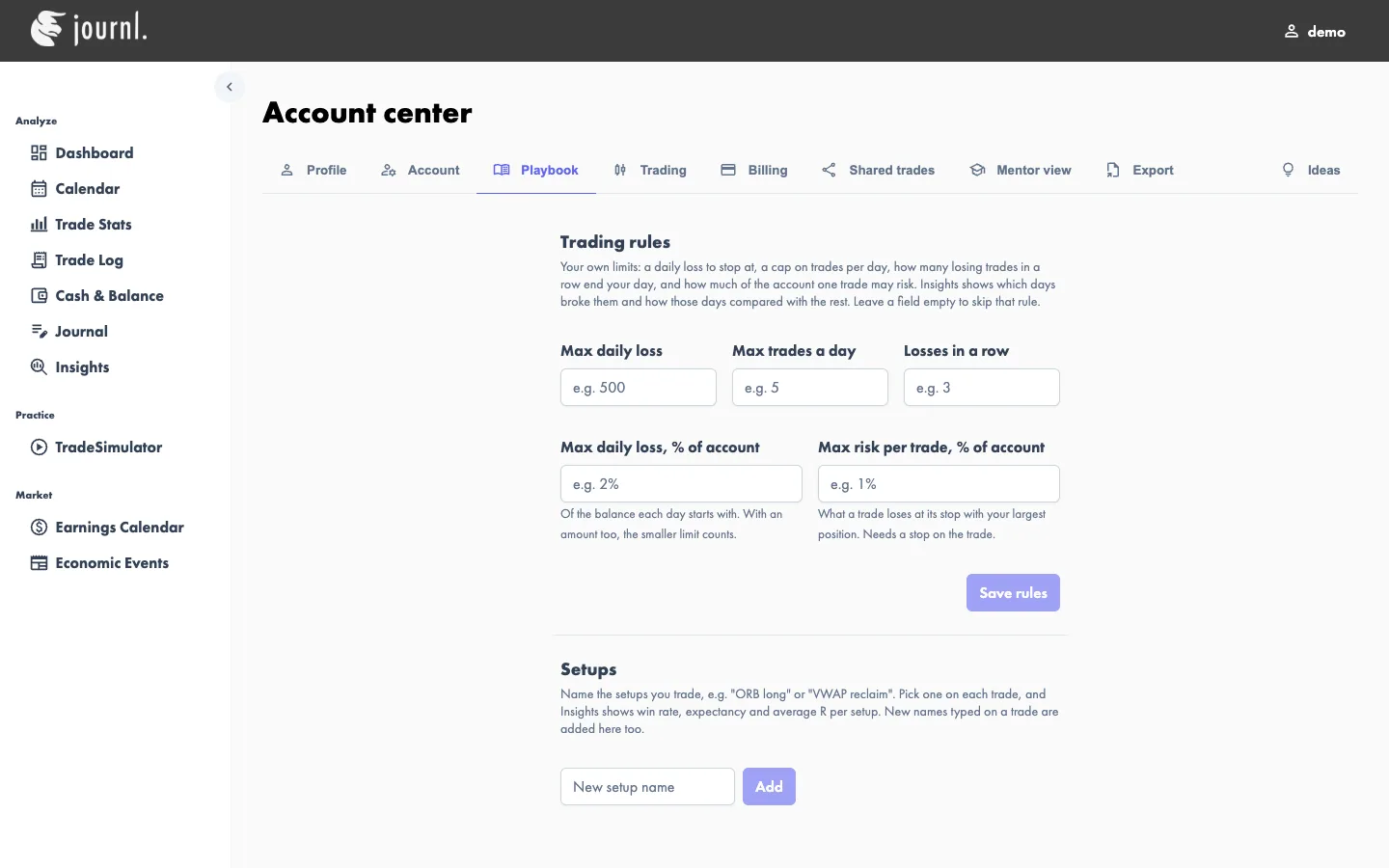
In Account center → Playbook, fill in any of the rules and click Save rules:
- Max daily loss: the loss at which you stop trading for the day.
- Max trades a day: a cap on how many trades you take.
- Losses in a row: how many losing trades in a row end your day.
- Max daily loss, % of account: the same limit as a share of the balance the day starts with, so it grows and shrinks with the account. With a fixed amount too, the smaller of the two counts.
- Max risk per trade, % of account: the most one trade may lose at its stop with your largest position. It needs a stop on the trade.
The two percent rules use your balance from Cash & Balance. Days without a balance are not checked against them. The Rules tab in Insights also shows your average and largest risk per trade and how many trades went over your limit.
Leave a field empty to skip that rule. Your rules also fill in the max trades and daily stop when you plan the day.
Name your setups
Add the setups you trade, for example "ORB breakout" or "VWAP reclaim", on the same tab. Then pick one on each trade in the Setup panel of the trade review. A new name typed on a trade is added to your playbook too.
Remove a setup with the × on its chip. Trades that already use it keep the name.
Insights → Setups
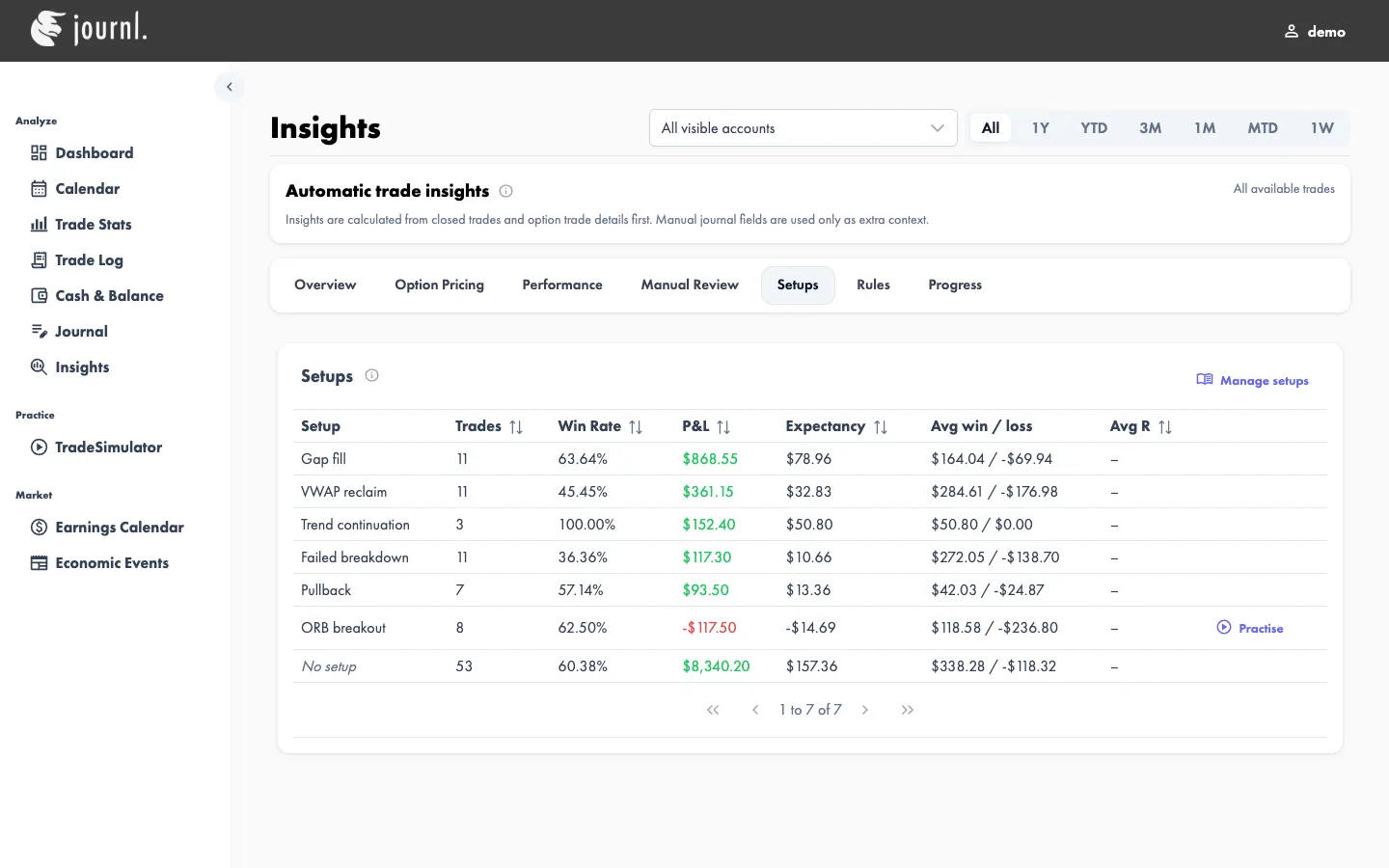
One row per setup with trades, win rate, P&L, expectancy (average P&L per trade), average win and loss, and average R. Trades without a setup are grouped under No setup. A setup that loses money gets a Practise button, which opens the TradeSimulator so you can rehearse it on real market days without risk. Your practice trades are tagged with that setup, so the simulator's By setup table shows how the practice goes.
Insights → Rules
Compares the days you followed your rules with the days that broke a rule: how many, total P&L and P&L per day. Your rules shows how often each one was broken, and Days that broke a rule lists each day with the rule it broke.
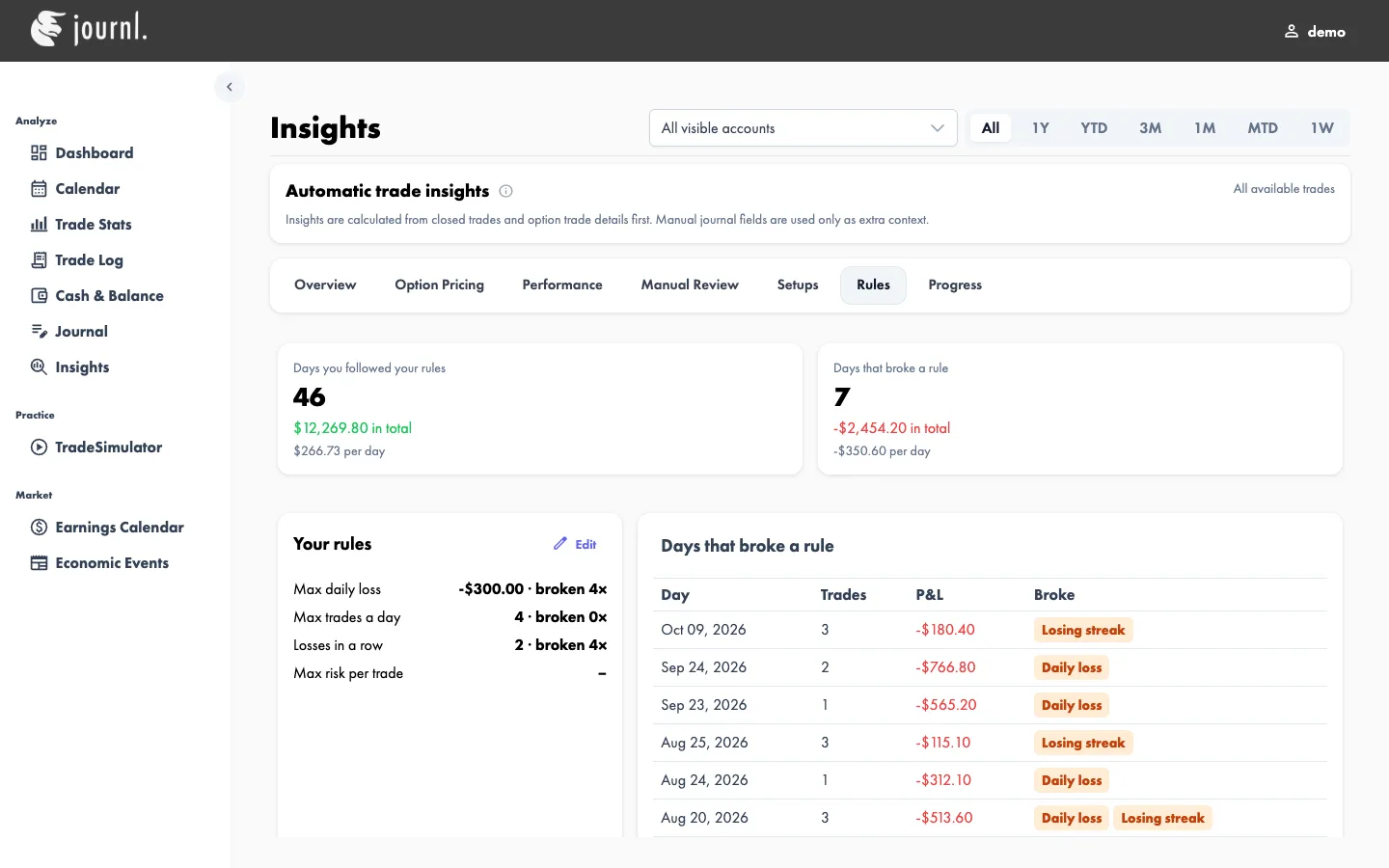
Rules are checked on your closed trades, day by day, in your time zone. Changing a rule recalculates the past too, so you can see what a different limit would have saved. Insights: Basic, Premium, Pro
Setups and trading rules
Your playbook is the setups you trade and the rules you trade by. Set it up once in Account center → Playbook, and Insights shows which setups make money and what breaking a rule costs you.
Set your trading rules
In Account center → Playbook, fill in any of the rules and click Save rules:
- Max daily loss: the loss at which you stop trading for the day.
- Max trades a day: a cap on how many trades you take.
- Losses in a row: how many losing trades in a row end your day.
- Max daily loss, % of account: the same limit as a share of the balance the day starts with, so it grows and shrinks with the account. With a fixed amount too, the smaller of the two counts.
- Max risk per trade, % of account: the most one trade may lose at its stop with your largest position. It needs a stop on the trade.
The two percent rules use your balance from Cash & Balance. Days without a balance are not checked against them. The Rules tab in Insights also shows your average and largest risk per trade and how many trades went over your limit.
Leave a field empty to skip that rule. Your rules also fill in the max trades and daily stop when you plan the day.
Name your setups
Add the setups you trade, for example "ORB breakout" or "VWAP reclaim", on the same tab. Then pick one on each trade in the Setup panel of the trade review. A new name typed on a trade is added to your playbook too.
Remove a setup with the × on its chip. Trades that already use it keep the name.
Insights → Setups
One row per setup with trades, win rate, P&L, expectancy (average P&L per trade), average win and loss, and average R. Trades without a setup are grouped under No setup. A setup that loses money gets a Practise button, which opens the TradeSimulator so you can rehearse it on real market days without risk. Your practice trades are tagged with that setup, so the simulator's By setup table shows how the practice goes.
Insights → Rules
Compares the days you followed your rules with the days that broke a rule: how many, total P&L and P&L per day. Your rules shows how often each one was broken, and Days that broke a rule lists each day with the rule it broke.
Rules are checked on your closed trades, day by day, in your time zone. Changing a rule recalculates the past too, so you can see what a different limit would have saved. Insights: Basic, Premium, Pro