
Theme, privacy mode and formats
Categories
Theme, privacy mode and formats
Make journl. look and read the way you're used to. Everything here is in Account center → Account.
Theme
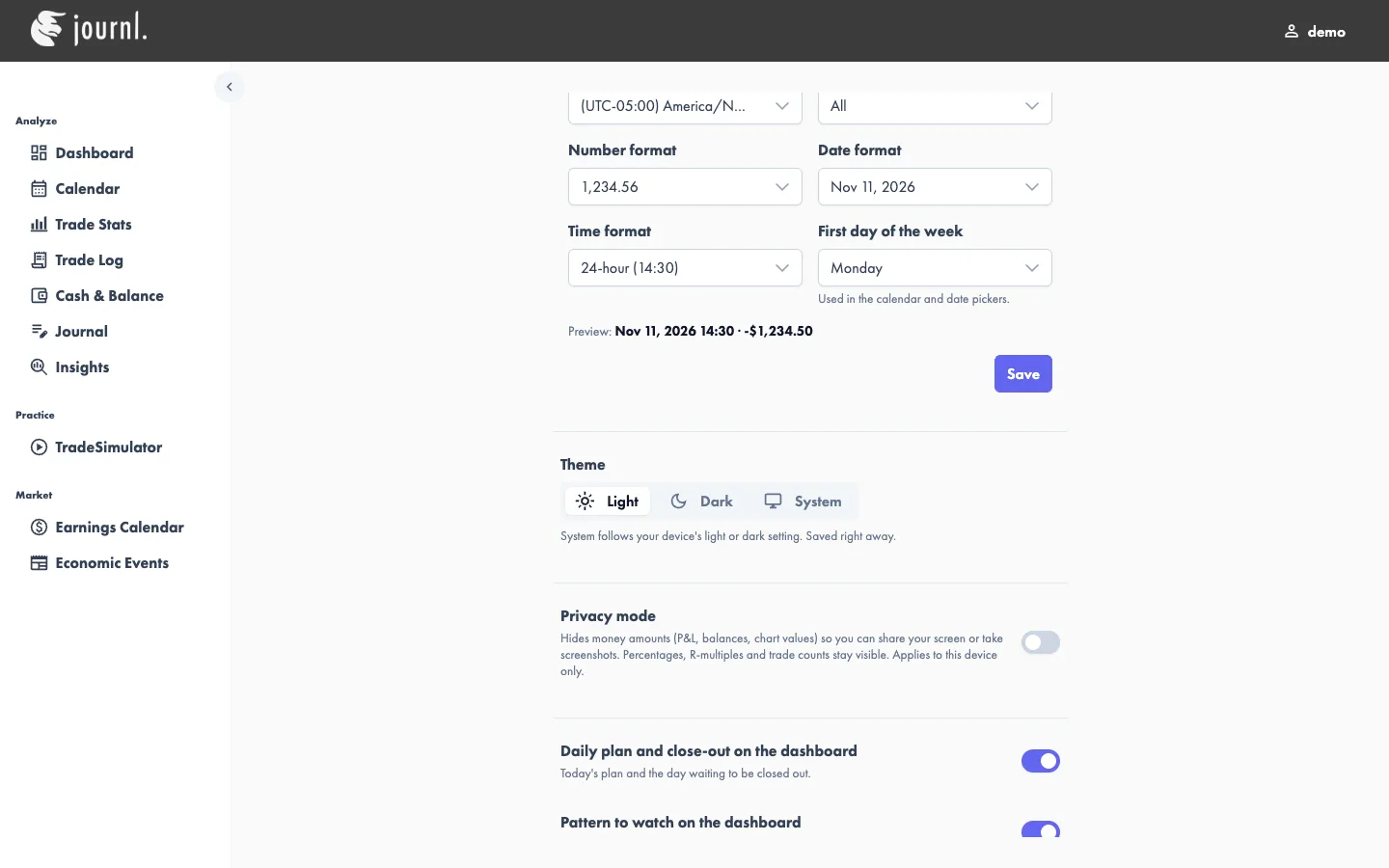
Choose Light, Dark or System. System follows your device's light or dark setting. The theme is saved as soon as you click it.
Privacy mode
Privacy mode hides money amounts (P&L, balances and chart values) so you can share your screen, stream or take screenshots. Percentages, R-multiples and trade counts stay visible, so your stats still make sense.
It applies to the device you turn it on, so you can keep amounts visible on your own computer.
Number, date and time formats
Under Personalization, choose:
- Number format: 1,234.56, 1.234,56, 1 234,56 or 1'234.56.
- Date format, for example Nov 11, 2026, 11.11.2026 or 2026-11-11, and Time format (24-hour or 12-hour).
- First day of the week, used in the calendar and date pickers.
- Your time zone and the default time range every page opens with.
A preview shows today's date and an amount in your formats. Click Save to apply them.
Dashboard cards
Two switches bring back or turn off the cards at the top of the Dashboard: Daily plan and close-out on the dashboard (see Plan the day and close it out) and Pattern to watch on the dashboard (see Progress, milestones and patterns).
Your time zone decides which trading day a trade belongs to, for close-outs, rules and the calendar. Set it to where you trade from.
Theme, privacy mode and formats
Make journl. look and read the way you're used to. Everything here is in Account center → Account.
Theme
Choose Light, Dark or System. System follows your device's light or dark setting. The theme is saved as soon as you click it.
Privacy mode
Privacy mode hides money amounts (P&L, balances and chart values) so you can share your screen, stream or take screenshots. Percentages, R-multiples and trade counts stay visible, so your stats still make sense.
It applies to the device you turn it on, so you can keep amounts visible on your own computer.
Number, date and time formats
Under Personalization, choose:
- Number format: 1,234.56, 1.234,56, 1 234,56 or 1'234.56.
- Date format, for example Nov 11, 2026, 11.11.2026 or 2026-11-11, and Time format (24-hour or 12-hour).
- First day of the week, used in the calendar and date pickers.
- Your time zone and the default time range every page opens with.
A preview shows today's date and an amount in your formats. Click Save to apply them.
Dashboard cards
Two switches bring back or turn off the cards at the top of the Dashboard: Daily plan and close-out on the dashboard (see Plan the day and close it out) and Pattern to watch on the dashboard (see Progress, milestones and patterns).
Your time zone decides which trading day a trade belongs to, for close-outs, rules and the calendar. Set it to where you trade from.