
Share your progress with a mentor
Categories
Share your progress with a mentor
A mentor view link gives a mentor, coach or accountability partner a private, read-only page with your trading routine. They don't need a journl. account, and they can leave you a comment. Pro
Create a link
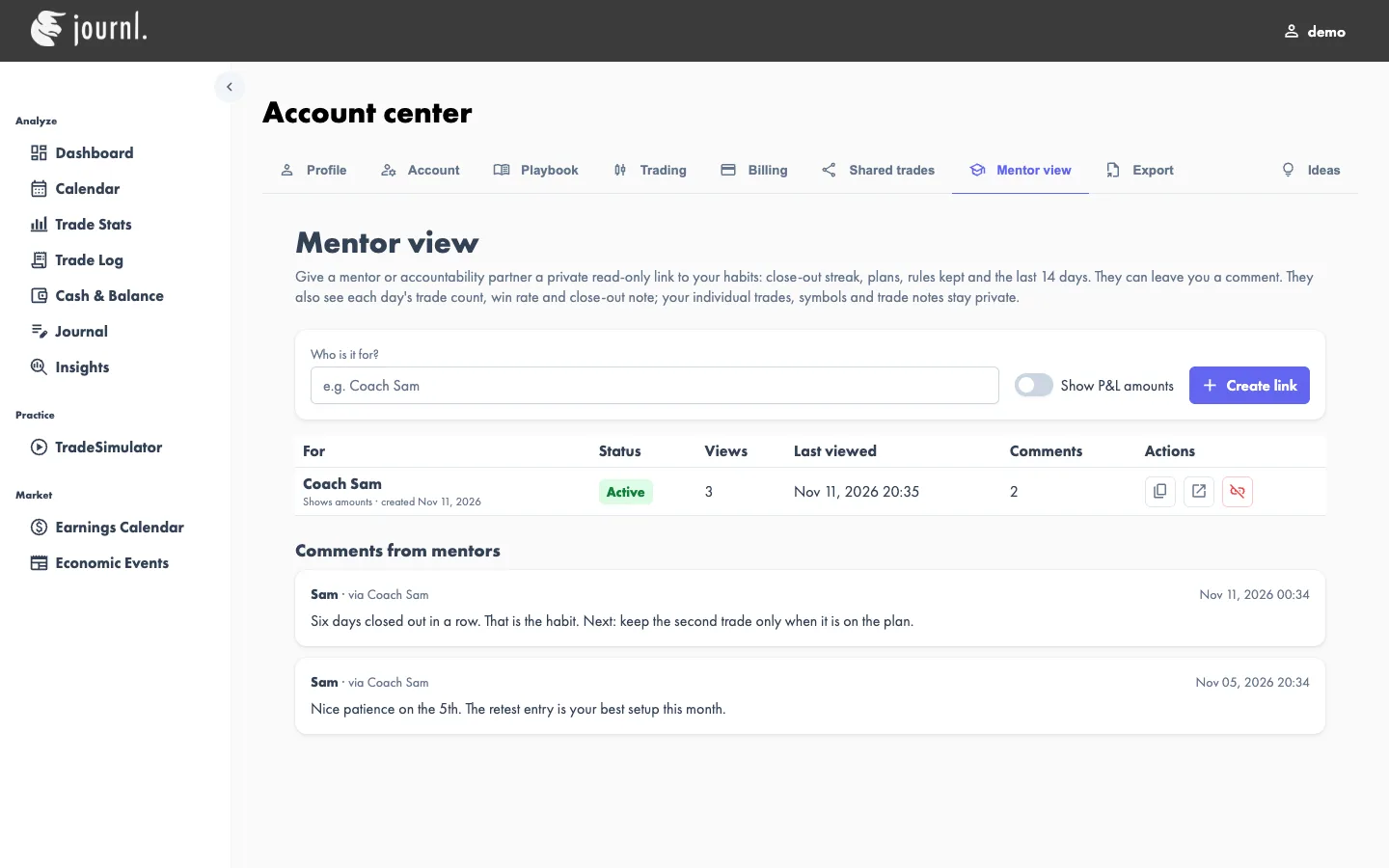
- Open Account center → Mentor view.
- Under Who is it for?, type a name you'll recognise, for example "Coach Sam".
- Turn on Show P&L amounts only if you want them to see money amounts.
- Click Create link, then copy it and send it to them.
Create a separate link for each person. The table shows each link's status, how often it was viewed, when it was last viewed and how many comments it has.
What your mentor sees
- The last 30 days: close-out streak, days closed out, days planned, share of trades reviewed and days within your rules.
- The last 14 days, day by day: number of trades, win rate and how many you reviewed; whether you planned, kept to the plan (including any setup you took that wasn't in it) and closed the day out; and your "one thing to do differently" note.
- Your rules and how often each was broken, and your milestones.
- Net P&L and your daily loss limit, only when the link shows amounts.
Your individual trades, symbols and trade notes stay private. The page is about the routine, not the positions.
Comments
At the bottom of the page your mentor can leave a check-in with their name and a short comment. You find it in three places:
- A notice on your Dashboard until you've read it.
- Comments from mentors in Account center → Mentor view.
- An email, at most once a day. Turn it off under Mentor comments in Account center → Account.
Revoke a link
Click the revoke icon next to the link. The page stops working straight away and shows that the link is no longer available. If you leave the Pro plan, your links stop working too; they stay listed so you can still revoke them.
To show someone a single trade instead, see Share a trade.
Share your progress with a mentor
A mentor view link gives a mentor, coach or accountability partner a private, read-only page with your trading routine. They don't need a journl. account, and they can leave you a comment. Pro
Create a link
- Open Account center → Mentor view.
- Under Who is it for?, type a name you'll recognise, for example "Coach Sam".
- Turn on Show P&L amounts only if you want them to see money amounts.
- Click Create link, then copy it and send it to them.
Create a separate link for each person. The table shows each link's status, how often it was viewed, when it was last viewed and how many comments it has.
What your mentor sees
- The last 30 days: close-out streak, days closed out, days planned, share of trades reviewed and days within your rules.
- The last 14 days, day by day: number of trades, win rate and how many you reviewed; whether you planned, kept to the plan (including any setup you took that wasn't in it) and closed the day out; and your "one thing to do differently" note.
- Your rules and how often each was broken, and your milestones.
- Net P&L and your daily loss limit, only when the link shows amounts.
Your individual trades, symbols and trade notes stay private. The page is about the routine, not the positions.
Comments
At the bottom of the page your mentor can leave a check-in with their name and a short comment. You find it in three places:
- A notice on your Dashboard until you've read it.
- Comments from mentors in Account center → Mentor view.
- An email, at most once a day. Turn it off under Mentor comments in Account center → Account.
Revoke a link
Click the revoke icon next to the link. The page stops working straight away and shows that the link is no longer available. If you leave the Pro plan, your links stop working too; they stay listed so you can still revoke them.
To show someone a single trade instead, see Share a trade.